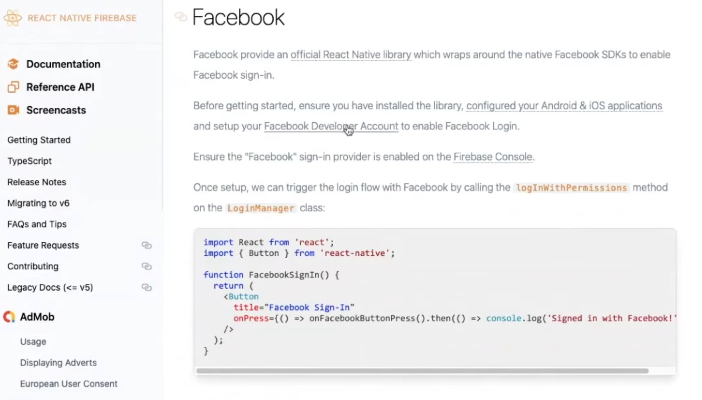
Hi, everybody. We are Dappros team. We it’s an experimental conversation about react native technology. So the topic of this one is will start from social sign on discussion. So right now in the call with me I have team members Nikhil Bankar and Vineeth Nambiar and we’ll just talk about some things like that. So one thing that I have in mind and in this conversation will be asking any sort of questions and we don’t pretend to know the answers and we’ll just be researching some things as we go forward. So one thing I have been trying to wrap my head around is what’s the best way to implement social sign-on mechanism in react native applications so we can just search together. I will share my screen and social login. Login. Yeah Implement is what one thing I’ve been trying to understand is What is the native or what the recommended way and I know that there is Firebase documents about that. So maybe that’s like first question. I would like to ask Vineeth is the what do you think? So there is Firebase document about social authentication. So is this the recommended way or there are other ways to implement social sign on.
This is not the recommended way but this would be a best way for our product as because we are already using Firebase. So any the other way would be to use that react native social login Library, I guess and so basically the main thing that is required for social sign-on or login in react native or any in any application is to configure this particular thing in for example, if you are using Facebook, then we have to go to developer.facebook.com and configure it over there and similarly for Google to we have to go into developer console of Google and then we have to set up those things that will be the basic thing. And the library that we are using currently if we are using Firebase then it will handle the request and response using the component and I think yeah, so so so just to so I get it right. So if we want to provide the button in our app, so, you know signing or log in with Facebook. We have like multiple options one option is we go directly to Facebook and check their API SDK for that enable us as a application of Provider There in facebook developer account and then do it directly and another way seen this in Firebase that we can added via Firebase console. Just enabling facebook signing provider as they say here, right? Yeah. So which which is better or do you think or are they equal or you know, which one?
Yeah, I think from what I have seen from my experience I have used both of the ways And Firebase would be better because there’s would be the consistent way and then we don’t have to worry about the future changes in Facebook’s API if there are any or any Google’s because they would update the library too that is Facebook Sorry Firebase is and yeah, so that way I think Firebase would be the better option for us.
Rather than just directly Linking our app to Facebook and separately Google. So Firebase will have this has this capability of making this available in just one Bunch. That is one Library itself. So I think firebase would be the better option and maybe it will also have might also we can also document it via Firebase too That is an for analytics I guess we can we will also have the data over there. Like I guess I am not sure about this because but I think we will be able to record how many traffic we have from Facebook. That is via Facebook login or via Google login we can have that data. So yeah, I think Firebase would be the best option.
Okay, that’s that’s very useful to know and I thought pretty much as much so it sounds like in our case and in cases where you have where you are already using Firebase and definitely in cases very well in many cases where you have an Android app. You would be using Firebase its kind of would be one of the easier options, but if you don’t have to do that you can do you can directly implement it via providers.
So next question here is something to understand as well is what kind of a I’m not sure you know, how it works like like the whole thing technically, you know, I worked with all those Authentication in the past. There are all these like sort of plugins. So obviously main thing. And with this solution is that the password itself or any security credentials and not exposed. So that’s the main idea so we can log in but login is handled by third-party providers like apple or Facebook or Google and we have told that this user is okay and we log in knowing That is like user with given credentials but our application and our front end or our back-end as a developer We don’t get any access obviously to any of those social networks passwords of that user right?
Yeah, exactly. The main idea over here is that using the third party libraries like the firebase I mean using social sign-on that is login via Facebook login via Apple like he’s not here and Google is that the be if that particular user is logged as is a member that is a user of apple or I mean is in the database of Apple or Facebook or Google then that person is with a verified user. So we don’t have to worry about the verification of the with the genuinity of the user whether it’s a bot user or we don’t have to worry about those things. So these big companies system login system We can assure that okay this particular user is genuine. And this and like you said, we don’t have to expose the users don’t have to Expose their password and other stuff. So yeah, I think that’s how these things work and better in this way.
So we get some sort of token in your response so I can do with apple case We should receive identity token with Facebook scenario We should receive access token and Twitter what we get some sort of AUTH token as well I guess Google what we get with Google Google auth provider id token. So this token is something that tells us that this is a valid user. Yeah, and what do we do with this afterwards? So we as far as I understand with Facebook and you know Gmail for example login we would be getting Some you some information about that user like first name last name their email address and maybe a photo as well. So some sort of data we can use for identifying the user in our app, right? Yeah. Yeah exactly. So it works for both the registration for our registration and also for the login purposes that is for example, if that particular user is not already a member of Dappros that is Chai connect for example, then what we can do is get their information get this particular token and other information from this library and use it to register this particular user into our Chai Connect. So if you know if you have noticed there are some there are there are many applications wherein they don’t have a specific registration page.
If you are not a member of that particular application you just you don’t need to you just need to log in via Google or log in via Facebook. The other things where registration and login part is already done by that particular instance in that particular instance itself. So that’s the main logic what I have here. Then there was my there was my next question and they actually so if what happens if so, okay. We have our custom platform our custom application. Like everybody is building something they want to login the user into their system. So he was is then they use those credentials to not sure for most cases, but I know our current flow is in previous versions, at least we still create a user account in our server side In our backend system with these credentials, Umm not not with this credentials but with knowing that this is the user and we have this first name last name and we create account in our back-end but is it Okay not to do that and just login the user always with this social signing.
It depends on what kind of Like for example for chai connect, I think we cannot do that directly because we need more information than just email and other stuff I guess as far as I remember and that is the is out information. Right? So if you want also allow users to view or edit their profile or to to to have some wallets or some some sort of account and have some points in the system then you have to create User and yeah, exactly. How we can how we can create a UX basically this would be the UI UX part where in we just allow the user to log in but we don’t we don’t give them the if they want the feature of token sending and all those stuff then they need to have to fill those information. That is they need to complete the registration part basically so we can Once they log in we can put a modal or anything wherein they need to fill the other information that our system requires so that they their wallet can be enabled and they can later on successfully transfer tokens. So in our case we will need extra information, but we can handle it in this fashion. Like just let them login and then later on other details that is required. But for this I think we will also need to change our back-end’s architecture too.
Maybe I am not sure about this but yeah. Now, let’s clear. Thank you Vineeth but another important question here is what happens if so is the I don’t know What’s the best practice here, but users can log in with their Facebook account and next time the same user might login with the Google or Gmail account. So for the system purposes, those would be two different users. Right?
No, I think because the system would recognize that this is the same user because the they are using our same because yeah, for example if my email ID at the rate gmail.com, so I have created an account on Facebook with this particular Gmail ID and the same with the in Google too I have this particular email ID that I’m using so if I’m logging in Initially with Facebook then this particular email ID is what we need to store Into our database and next time if that particular user if I am logging in via Google then I know that okay This is the same email ID So this is the same user. Yeah.
If that’s the case, right because there are might be cases where people use different emails for different social network, then they would have a different account. Okay, that’s what I wanted to clarify that’s possible. And I know that sometimes systems They try to implement some logic from merging the account or yeah, like in a client I just had a conversation recently I won’t name the client because we want to make this public podcast, but basically in their scenario, they allow people to log in with social. But they have no control obviously of Which social sign-in the user is going to use if the users are using different emails. And also they have membership which is handled in the their network, which is handled in hubspot. So what they do is they first login the user and via Facebook or Google any social sign-in which they support then they check via hubspot API if that email of that provided by the social one sign in token of that user is a member of the list on the HubSpot, If not, then we they have two options either say, you know, you are not a member you’re not allowed in the system second option is merge the accounts so allow the user to to say, okay Actually I have this another email and yeah, I can log in I can log in with that as well. And this way, you know that this email from this social network and that email from that other social network and one of them is connected to my membership. So they all are part of the same and you In the merge and glue them together for this system purposes. Yeah, I guess that was logic there, right? Yeah, I think we are we can also do that obviously. I’ve seen such scenarios. Where in there there is also a requirement where you are not using one part. For example, if I have logged in using my email ID one with chai connect and then later on I realized that okay I don’t I’m not going to use email ID one so I have created email ID two so I need to transfer my account to email ID two. this is also another scenario not similar I would say but something wherein we have to merge the back that particular email ID one’s information into email id two. So yeah, so I have encountered with such with applications wherein this too happens. So so I’m already thinking here about our backend and our platform. So we and just generic scenario as Well where somebody wants to support multiple users from different social signing mechanisms. But ultimately they want to know that that is the same user when they even with the user uses different emails what we could potentially do is our in our user database in our users collection or record or you know database schema for users in our user API. We could store separate records for you know for Facebook for Twitter for Gmail. And so for example, we that way we can match so and that would that that way the merging would happen so even if the user has different emails for different social networks, they will have the option to say, okay I’m also on that network and on that Network and then in our user entity for each network will have a recorded email from that Network in the same user entity. So that way the merge will happen. I know it’s a bit. Yeah, it really needs some additional logic there. So Probably after the user has logged in we need to tell them this is the way we recognize you. But if you’re also on other networks with other emails, then you might want to do those logins right now. So our system recognizes to merge your account, right? Okay, that sounds like the way forward. I’m not sure if the there are better more elegant ways to do that, but so that seems to be the way. Okay, so that’s that’s very useful and this gives the seamless experience. any other alternative ways to allow users and I know some some platforms like slack For example, they provide one off signing. So you can even without having to log in to provide login and password. You can just say OK I want to log in and then you receive a unique sign in key or link so you can use that and get into the app for just very directly from your email. I don’t think I’m aware of that. Yeah, like Slack and some others are doing. We always obviously trying to find the easier options to provide seamless experience for the Developers for the users. So yeah, I think that’s that’s useful high-level understanding. So thank you very much. And I think for the purpose of this discussion, we have covered it and thanks everybody. We will put this online this discussion and there we are happy to receive a feedback bag and also comments about what other topics we need to cover next. So cool. Thanks everybody and stay in touch for the new updates from us.